
The minimum inputs you need:
- Start time and end time for each shift (with AM/PM or 24-hour format confirmed)
- Unpaid break duration per shift (paid short breaks stay in the total)
- Workweek anchor day (the day your fixed 7-day workweek begins)
- Hourly rate (only if you want a gross pay estimate alongside the hours)
For a single shift or a quick check, the Fastsavemedia Work Hours Tracker handles live timing and daily logs without any signup. For a full week of shifts with export, the Timesheet Calculator and Weekly Timesheet Generator produce payroll-ready output in CSV or PDF. Manual math is fine for spot-checking one shift; use a calculator the moment you have three or more shifts to total.
Key Takeaways
Accurate payroll hours require correct inputs, proper break classification, and decimal conversion before any total goes to a payroll system.
| Point | Details |
|---|---|
| Core formula | Paid hours = (end time − start time) − unpaid breaks only; paid short breaks stay in the total. |
| Decimal conversion | Minutes ÷ 60 gives the decimal fraction; 1:30 equals 1.5, never 1.30. |
| Overtime test | Apply the 40-hour threshold across the fixed seven-day FLSA workweek, not per day (unless state law requires it). |
| Rounding compliance | Any rounding interval must be neutral over time per 29 CFR § 785.48; systematic rounding down at clock-out is a wage violation. |
| Fastsavemedia tools | The Work Hours Tracker, Timesheet Calculator, Weekly Timesheet Generator, and Overtime Calculator run on-device with no signup and export CSV or PDF. |
Table of Contents
- Which free calculators should you use to track hours?
- How do you calculate work hours step by step?
- How do you convert between hh:mm and decimal hours?
- What timecard settings and rounding rules do employers use?
- How do overnight shifts and U.S. overtime rules work?
- How do you prepare calculator output for payroll systems?
- When does a one-off calculator stop being enough?
- The case for keeping it simple (and knowing when not to)
- Fastsavemedia’s free tools for calculating and exporting work hours
- Sources
Which free calculators should you use to track hours?
The right tool depends on what you’re calculating:
- Weekly timesheet calculator: Needs all seven days’ punches, a workweek start day, and break entries. CalculatorSoup’s Work Hours Calculator covers break deductions, overtime after 40 hours, and hh:mm-to-decimal conversion in one view.
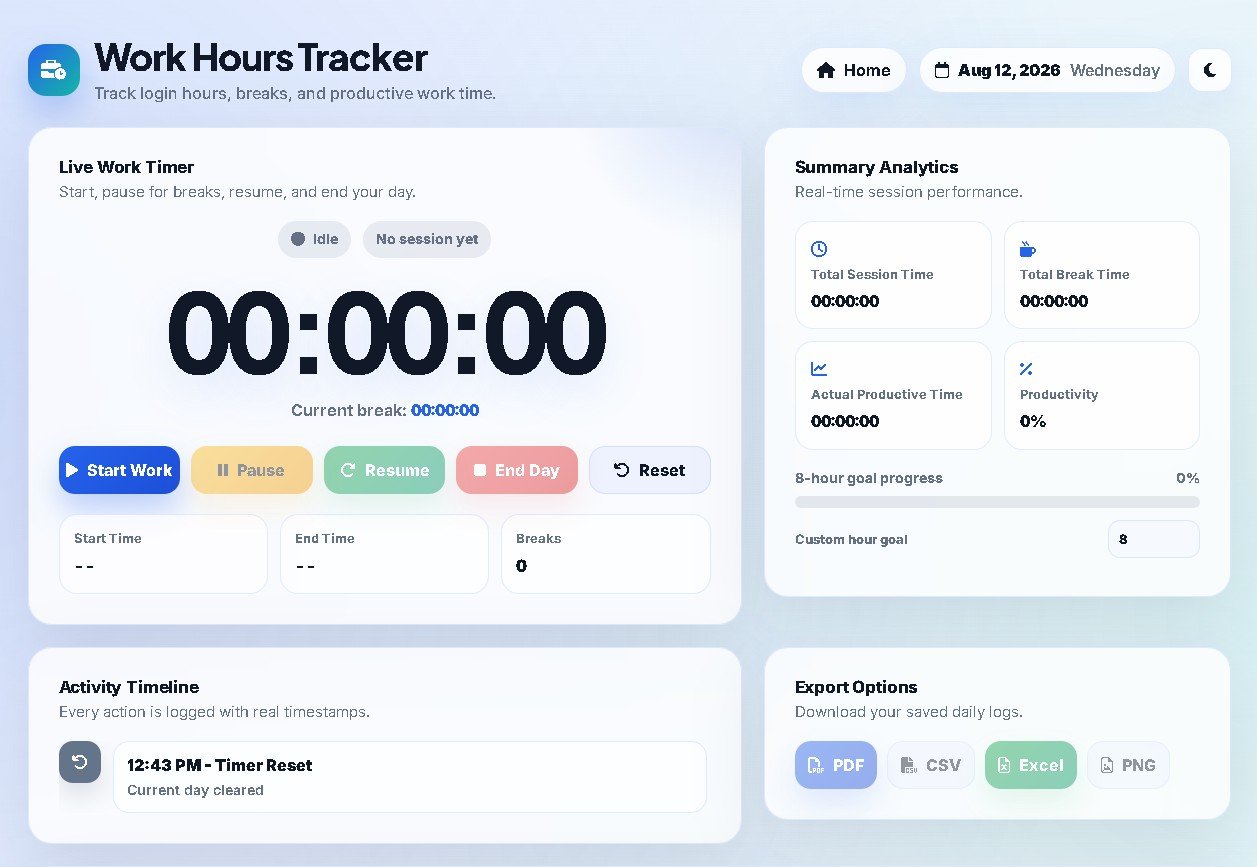
- Live shift timer and daily log: Fastsavemedia’s Work Hours Tracker runs entirely in your browser, no upload, no account. It timestamps punches in real time and logs daily totals.
- Weekly timesheet with PDF export: The Fastsavemedia Weekly Timesheet Generator outputs a print-ready PDF and a CSV you can drop straight into payroll.
- Overtime calculator: The Fastsavemedia Overtime Calculator takes your weekly hours total and hourly rate and returns regular pay, overtime pay, and gross pay separately.
All Fastsavemedia tools run on-device. Nothing is sent to a server, and no login is required.
| Your situation | Use this | Output |
|---|---|---|
| Timing a shift as it happens | Work Hours Tracker | Live timer + daily log |
| A full week of punches with breaks | Timesheet Calculator | hh:mm + decimal totals, CSV |
| Something to hand an accountant | Weekly Timesheet Generator | Print-ready PDF |
| Splitting regular vs overtime pay | Overtime Calculator | Regular, overtime, gross pay |
Pro Tip: Before exporting any calculator result, do a 30-second sanity check: confirm the hh:mm total and the decimal total agree (8:30 should equal 8.5, not 8.3), and verify the day count matches the number of shifts you entered.
How do you calculate work hours step by step?
Single shift
- Confirm AM/PM or 24-hour format. A missed PM turns 1:00 PM into 1:00 AM and wipes out 12 hours.
- Assign the correct date to each punch. If the shift crosses midnight, the end time belongs to the next calendar day.
- Subtract the end time from the start time to get raw elapsed time.
- Deduct only unpaid meal periods. Per FLSA guidance, short breaks of roughly 5–20 minutes are compensable and stay in the total; a bona fide meal period of 30 minutes or more can be unpaid only when the employee is completely relieved of duty.
- Convert remaining minutes to decimal hours (see the next section).
The core formula: paid hours = (end time − start time) − unpaid break(s)
Rolling daily totals into a weekly payroll total
Add each day’s paid hours in hh:mm, then convert the weekly sum to decimal. Test overtime against the full fixed workweek, not day by day (unless your state mandates daily overtime).
Worked example: 3-shift week
| Day | Shift | Unpaid break | Paid (hh:mm) | Decimal |
|---|---|---|---|---|
| Monday | 9:00 AM – 5:30 PM | 30 min | 8:00 | 8.00 |
| Wednesday | 10:00 AM – 6:30 PM | 30 min | 8:00 | 8.00 |
| Friday | 9:00 AM – 5:45 PM | 30 min | 8:15 | 8.25 |
| Week total | — | 90 min | 24:15 | 24.25 |
Friday’s 15 minutes becomes 0.25 (15 ÷ 60 = 0.25). The weekly decimal total is 24.25 hours, well under the federal overtime threshold.
How do you convert between hh:mm and decimal hours?
The formula is straightforward: decimal hours = whole hours + (minutes ÷ 60). Reverse it with: minutes = (decimal fraction) × 60.

The most common mistake in payroll math is treating 1:30 as 1.30 instead of 1.5. The colon is not a decimal point. Thirty minutes is half an hour, so 1:30 = 1 + (30 ÷ 60) = 1.5.
Quick reference: minutes to decimal
| Minutes | Decimal | Minutes | Decimal |
|---|---|---|---|
| 5 | 0.083 | 35 | 0.583 |
| 10 | 0.167 | 40 | 0.667 |
| 15 | 0.25 | 45 | 0.75 |
| 20 | 0.333 | 50 | 0.833 |
| 25 | 0.417 | 55 | 0.917 |
| 30 | 0.50 | 60 | 1.00 |
For spreadsheets, if your time is in cell A1 formatted as hh:mm, use =HOUR(A1) + MINUTE(A1)/60 to get the decimal equivalent. Everhour’s hours calculator shows the same conversion applied to multi-shift totals, which is useful for verifying your formula against a known result.
What timecard settings and rounding rules do employers use?
Timecard configuration choices directly change the totals employees get paid on. The main settings:
- Clock format: 12-hour (AM/PM) or 24-hour. Pick one and enforce it consistently to prevent AM/PM entry errors.
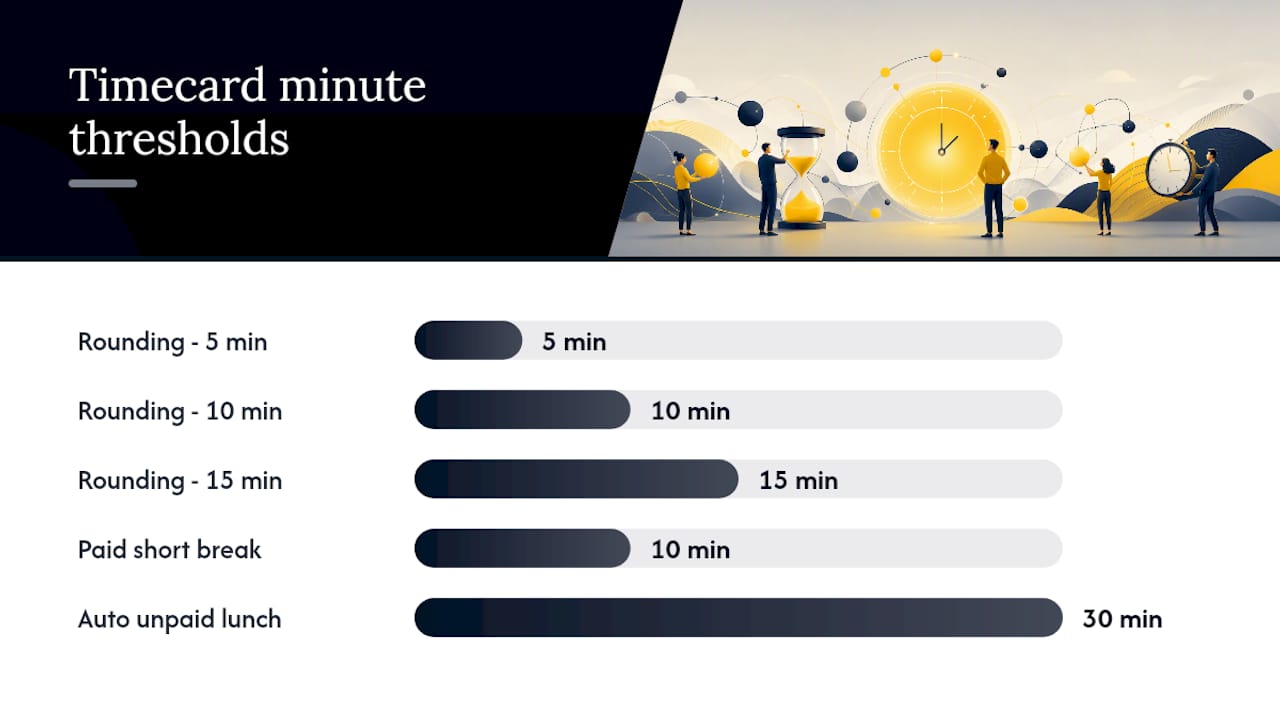
- Rounding interval: Nearest 5, 10, or 15 minutes. Under 29 CFR § 785.48, rounding is only permissible when the system is neutral over time and does not result in underpayment.
- Pay interval: Weekly, biweekly, semi-monthly, or monthly. This affects when overtime thresholds reset.
- Automatic unpaid lunch deduction: Many systems auto-deduct 30 minutes if a shift exceeds a set length. This is legally acceptable only when the employee is genuinely relieved of duty for that period.
- Grace periods: A 5- or 7-minute grace window around scheduled punches reduces noise from early arrivals. It must be applied symmetrically to clock-ins and clock-outs.
Paid short breaks (a 10-minute rest period, for example) must stay in the compensable total. Deducting them is a wage violation under FLSA.
Pro Tip: Choose a 15-minute rounding interval only if your timekeeping system rounds both early and late punches symmetrically. If it always rounds down at clock-out, it systematically underpays — which is exactly what the federal neutrality rule prohibits.
How do overnight shifts and U.S. overtime rules work?
Overnight shifts
When a shift crosses midnight, assign the end time to the next calendar day before subtracting. Example: a shift from 10:00 PM Monday to 6:30 AM Tuesday is 8 hours 30 minutes (8.5 decimal). If you subtract 6:30 from 10:00 without the date correction, you get a negative number. Calculatehours handles this automatically by adding 24 hours whenever end time is earlier than start time.
U.S. overtime basics
Under the Fair Labor Standards Act, overtime is calculated on a fixed workweek basis — a regularly recurring period of 168 hours (seven consecutive 24-hour periods). Hours beyond 40 in that workweek must be paid at 1.5× the regular rate for covered non-exempt employees.
The Department of Labor’s overtime page covers exemptions, the current salary threshold, and state-law overlays. Two things to keep straight: the workweek is fixed (it cannot shift week to week to avoid overtime), and daily overtime is a state-law concept, not a federal one. California, for instance, requires daily overtime after 8 hours; the FLSA does not.
How do you prepare calculator output for payroll systems?
Most payroll platforms expect one of three formats: a CSV with decimal hours, an Excel file with separate columns for regular and overtime hours, or a direct API feed. Manual exports from a calculator land in the first two categories.
Formatting checklist before you import:
- Convert all minutes to decimal. A column showing “8:15” will import as 8.15 in many systems, not 8.25. Fix it before upload.
- Separate regular and overtime hours into distinct columns. Payroll software applies different rates to each; a single “total hours” column forces manual splitting later.
- Verify dates and time zones. For multi-location teams, a shift logged in Pacific time and imported into an Eastern-time payroll system can land on the wrong date. The Time Zone Converter from Time and Date is a fast reference for confirming offset differences.
- Name files consistently:
YYYY-MM-DD_EmployeeName_Timesheet.csvkeeps records sortable and auditable.
Pro Tip: Run a gross pay check before submitting: total decimal hours × hourly rate = expected gross. If your calculator shows a gross pay figure, compare the two. A mismatch of more than a few cents usually means a rounding error or a missed break deduction.
When does a one-off calculator stop being enough?
A browser calculator handles most small-team and single-employee scenarios cleanly. The point where it starts to break down:
- Multiple overtime rules: If you have employees in California (daily overtime), Texas (federal only), and New York (weekly), a single calculator cannot apply all three rule sets simultaneously.
- Multi-state payroll: Different state wage laws, tax withholding, and reporting requirements need a system that tracks jurisdiction per employee, not per calculation.
- Frequent corrections: If you’re re-entering the same week’s data more than once a month, an audit trail matters. Calculators don’t log changes.
- Tip pooling or piece-rate pay: These require rate-blending math that goes beyond a standard hours calculator.
- Teams larger than roughly 10–15 people: Manual entry errors compound quickly at scale.
For smaller teams and straightforward schedules, Fastsavemedia’s office calculator suite covers the full workflow: live tracking, weekly timesheet generation, and overtime pay calculation, all without storing your data anywhere. When you need integrations, audit logs, and multi-state rule engines, that’s when dedicated time-tracking platforms earn their cost.
The case for keeping it simple (and knowing when not to)
Most payroll errors don’t come from bad math. They come from bad inputs: a missed AM/PM, a break that was deducted twice, or an overnight shift that wasn’t date-corrected. A good calculator eliminates the arithmetic risk but cannot fix a wrong punch time.
The practical approach: run a parallel check for the first two or three pay periods whenever you switch tools. Calculate the same week manually and with the new system. If they agree, you’re set. If they don’t, the discrepancy almost always traces to a policy setting (rounding interval, break type, workweek start day) rather than a formula error.
Privacy matters more than most teams realize. A browser-based, on-device tool means employee hours never leave the device. That’s a meaningful data-exposure reduction compared to uploading timesheets to a cloud service with unclear retention policies.
- Every punch has the correct AM/PM (or 24-hour) value.
- Overnight shifts are date-corrected to the next calendar day.
- Only unpaid meal periods were deducted — paid 5–20 minute breaks remain.
- hh:mm and decimal totals agree (8:30 = 8.5).
- Regular and overtime hours sit in separate columns.
- Decimal hours × hourly rate matches the calculator’s gross pay figure.
Fastsavemedia’s free tools for calculating and exporting work hours
No signup, no upload, no data sent anywhere. Fastsavemedia’s browser-based time tools run entirely on your device, which means your employee hours stay private by default.
Four tools cover the full workflow:
- Work Hours Tracker: Live shift timer with daily log. Start it when the shift begins, stop it when it ends. Exports a daily summary.
- Timesheet Calculator: Enter a full week of punches with breaks and get hh:mm totals, decimal totals, and a gross pay estimate. Exports CSV.
- Weekly Timesheet Generator: Produces a formatted, printable weekly timesheet in PDF. Clean enough to hand to an accountant or attach to a payroll submission.
- Overtime Calculator: Input weekly hours and rate; get regular pay, overtime pay, and gross pay broken out. No math required.
Open any tool now at Fastsavemedia office calculators and have a payroll-ready timesheet in minutes.
Sources
Recommended
Frequently Asked Questions
How do you calculate work hours for payroll?
Enter each shift's start and end time, subtract unpaid meal breaks only, convert the remaining minutes to decimal hours (minutes ÷ 60), and sum the results across your fixed seven-day FLSA workweek. The core formula is: paid hours = (end time − start time) − unpaid break(s). A free browser calculator such as the FastSaveMedia Timesheet Calculator does all of this in under a minute.
How do you convert minutes to decimal hours?
Divide the minutes by 60 and add the whole hours: decimal hours = whole hours + (minutes ÷ 60). So 1:30 is 1.5 hours, not 1.30; 8:15 is 8.25, not 8.15. Reverse it with minutes = decimal fraction × 60. In a spreadsheet with hh:mm in cell A1, use =HOUR(A1) + MINUTE(A1)/60.
Do you subtract breaks when calculating work hours?
Only unpaid breaks. Under FLSA guidance, short breaks of roughly 5–20 minutes are compensable and must stay in the paid total. A bona fide meal period of 30 minutes or more can be unpaid only when the employee is completely relieved of duty. Deducting a paid 10-minute rest break is a wage violation.
How is overtime calculated on a timesheet?
Under the Fair Labor Standards Act, overtime is tested on a fixed, regularly recurring workweek of 168 hours (seven consecutive 24-hour periods). Hours beyond 40 in that workweek are paid at 1.5× the regular rate for covered non-exempt employees. Daily overtime — for example California's after-8-hours rule — is a state-law concept, not a federal one.
Can employers round employee time on timecards?
Yes, but only within limits. Under 29 CFR § 785.48, rounding to the nearest 5, 10 or 15 minutes is permissible only when the system is neutral over time and does not result in underpayment. A system that always rounds down at clock-out systematically underpays and violates the federal neutrality rule.
How do you calculate hours for an overnight shift?
Assign the end time to the next calendar day before subtracting. A shift from 10:00 PM Monday to 6:30 AM Tuesday is 8 hours 30 minutes, or 8.5 decimal hours. Without the date correction the subtraction returns a negative number; calculators handle this by adding 24 hours whenever the end time is earlier than the start time.
Are free work hours calculators accurate enough for payroll?
For single employees and small teams with straightforward schedules, yes — the arithmetic is deterministic. They stop being enough when you have multiple overtime rule sets across states, multi-state tax withholding, tip pooling or piece-rate blending, frequent corrections needing an audit trail, or teams larger than roughly 10–15 people.