
Design robot eyes for an OLED, then copy the code
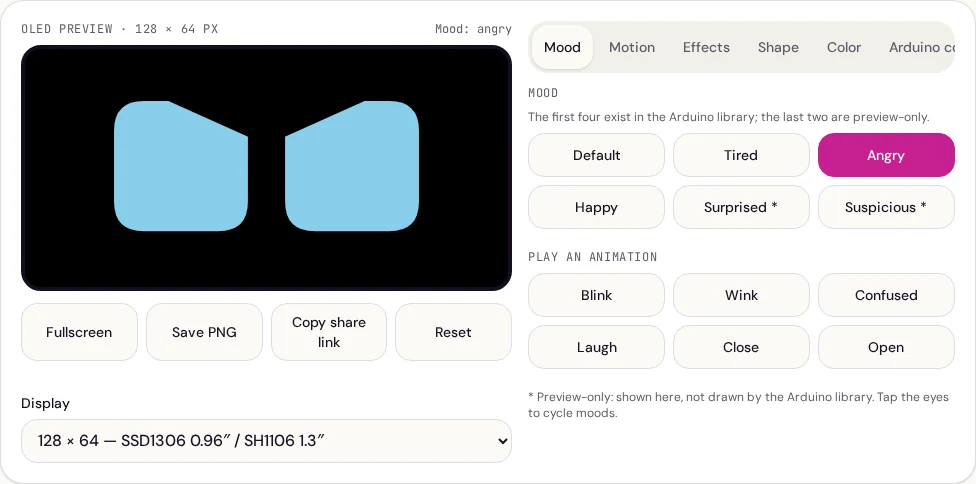
RoboEyes previews the animated eyes drawn by the open-source FluxGarage RoboEyes Arduino library, the friendly rounded eyes seen on many desktop robots built with an SSD1306 or SH1106 OLED and an Arduino, ESP32 or ESP8266. Instead of re-uploading a sketch for every tweak, you tune the look here and copy the result.
How to use it
- Choose your display, 128×64 (0.96″ SSD1306 or 1.3″ SH1106), 128×32 (0.91″) or 64×48 (0.66″). The preview uses real OLED pixels.
- Set the shape on the Shape tab: width, height, corner radius and the space between the eyes.
- Pick a mood, Default, Tired, Angry or Happy, and test one-shot animations such as Blink, Confused and Laugh.
- Add behaviour: auto-blink, idle look-around, curiosity at the edges, cyclops, sweat and flicker.
- Open the Arduino code tab, copy the sketch or download the
.inofile, and upload it.
Wiring and libraries
Disconnect power before wiring. Check the module and board documentation for both supply and I²C logic-voltage compatibility; 5 V supply support does not guarantee 5 V logic compatibility. For an I²C SSD1306 module connect VCC to its specified supported supply, GND to ground, and SDA/SCL to your board's I²C pins, A4/A5 on an Arduino Uno, or GPIO 21/22 by default on most ESP32 boards. In the Arduino IDE Library Manager install Adafruit SSD1306, Adafruit GFX and FluxGarage RoboEyes. If the screen stays dark, change the address in the sketch from 0x3C to 0x3D. SH1106 boards need the matching SH1106 display library in place of SSD1306.
Preview-only extras
Some options are marked with a star. Pupils, highlights, breathing, pointer tracking, the Surprised and Suspicious moods, non-rectangular outlines and sound reaction are drawn by this simulator only. They are handy for mock-ups, screen recordings or a full-screen robot face on a spare tablet, and the generated code lists anything it had to leave out so the hardware result is never a surprise.
Tips for a natural look
- Keep auto-blink on with a little random variation; perfectly regular blinking looks mechanical.
- Combine idle mode with curiosity so the outer eye grows when the robot glances sideways.
- Large corner radius values give round, cute eyes; small values look more serious.
- Keep
loop()free ofdelay()calls soroboEyes.update()can animate smoothly.
Privacy
Everything runs in your browser. Your design is saved in this browser and in share links you choose to copy. If you turn on sound reaction, microphone audio is analysed locally for loudness only, nothing is recorded or uploaded.