Act fast · free · no signup
Water-Damaged Phone Recovery: What to Do, Hour by Hour

Play the water eject tone now
Ready, press Play to start
Volume to max · speaker facing down · headphones unplugged
Tones are generated on your device with the Web Audio API. Nothing is recorded or uploaded. Stop if you hear rattling or distortion and lower the volume.
Modern smartphones survive water in three very different ways. Splash resistance (IPX4) survives a few droplets. Ingress protection level 6-7 (IP67, iPhone 7 through 10, Galaxy S7 through S10) survives one metre of fresh water for 30 minutes. IP68 (iPhone 12 onward, Galaxy S20 onward, Pixel 6 onward) is rated for 1.5-2 metres for 30 minutes [1]. None of those ratings survive salt water, chlorine, coffee, cola, beer or laundry detergent — the electrolytes in those liquids accelerate the corrosion of copper traces and battery contacts by a factor of 10 to 40 [5].
The three failure modes to prevent, in priority order, are: (1) short-circuit at power-on — the reason to switch off within 30 seconds; (2) electrolytic corrosion of exposed pads — starts at roughly 8 minutes on a wet, powered pad and continues for weeks until neutralised; and (3) battery swelling from moisture ingress into the polymer stack — visible within 48 to 72 hours on lithium-polymer packs [5][6]. This page tells you what to do at each of those three windows.
Covers: iPhone (SE, X, 11, 12, 13, 14, 15, 16 & the 16e) · Samsung Galaxy S, A, Z Flip / Fold series · Google Pixel 3 through 9 Pro Fold · OnePlus, Xiaomi, Redmi, Realme, Vivo, Motorola · older non-rated Android phones · folding phones (special-case treatment) · iPad / Android tablets.
Speaker output is the last function to recover in most liquid incidents, so once the phone boots reliably, check the speaker troubleshooting guide and then clear any dried mineral residue using how to clean phone speakers. iPhone owners will find the model-specific grille geometry in the iPhone speaker cleaning guide.
Step by step
Remove the phone from liquid safely
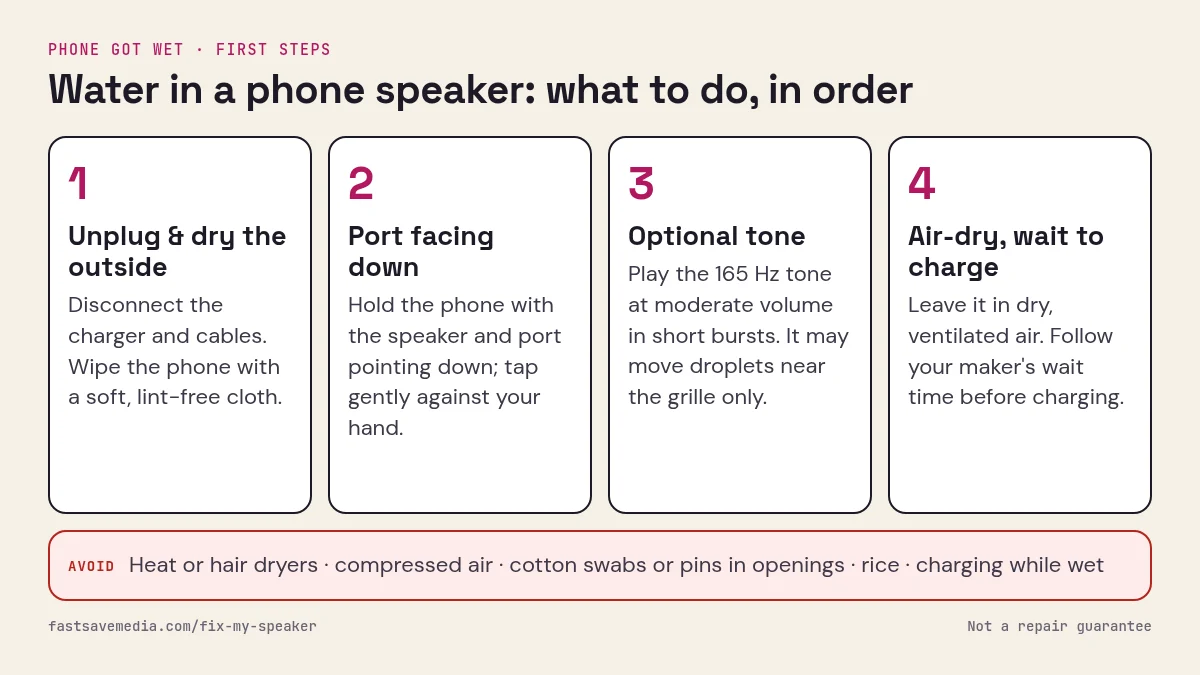
Retrieve it only when safe. Disconnect cables and switch it off if liquid may have entered. Do not keep operating it to check which parts still work.Dry the exterior without probing
Wipe with a soft lint-free cloth. Keep objects out of openings and do not open wet compartments. Follow the exact model’s liquid-exposure instructions.Avoid home drying shortcuts
Do not use rice, an oven, microwave, freezer, hair dryer or compressed air. A tone cannot dry circuitry or reverse corrosion.Get advice after contaminated-liquid exposure
Saltwater, pool water and sugary drinks can leave damaging residue. Seek manufacturer or qualified repair guidance promptly rather than waiting for an invented deadline.Do not infer recovery from audio or an alert
No universal waiting time, clear sound or disappearing alert establishes internal dryness. Follow manufacturer charging guidance; stop for heat, swelling or abnormal behaviour.Arrange assessment for persistent symptoms
Muffled audio, charging problems, ghost touches or abnormal power behaviour can have several causes. Do not repeatedly power on or charge to diagnose a potentially damaged device.
The First 24 Hours — Corrosion Timeline
- 0 – 5 seconds
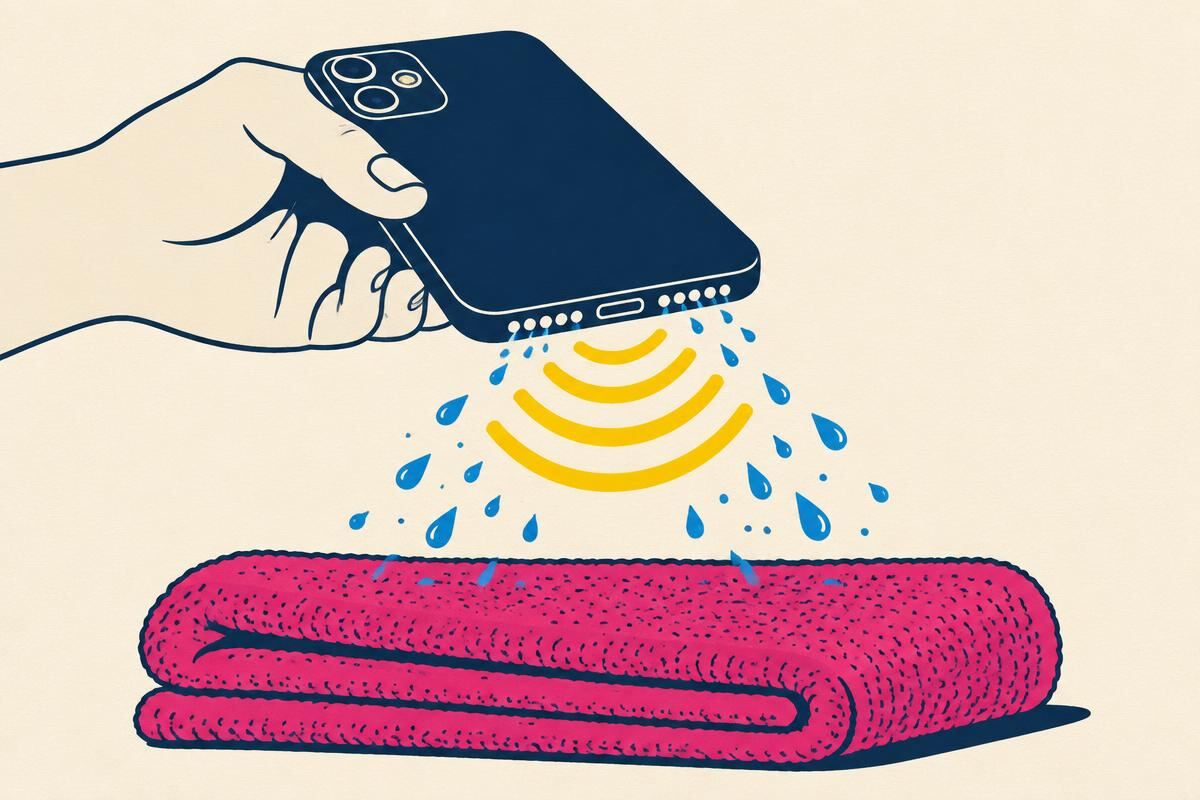
- Retrieve, hold ports-down, do not press any button
- 5 – 30 seconds
- Power off before short-circuit at a bridged trace
- 30 s – 8 min
- 8 – 60 min
- Electrolytic corrosion begins on any exposed pad still under water
- 1 – 6 h
- Splash cases usually fully evaporate under a room fan
- 6 – 24 h
- Shallow fresh-water dunk clears; battery drift not yet visible
- 24 – 48 h
- Chlorine / soap residue still active — do NOT power on yet
- 48 – 72 h
- Salt-water damage becomes irreversible without ultrasonic cleaning
Timeline derived from ASTM D5229 polymer moisture absorption curves [6] and iFixit lithium-polymer corrosion progression notes [5].
| Scenario | Immediate action | Wait time | Where to power on |
|---|---|---|---|
| Rain / splash on any IP67+ phone | 1 – 6 hours | Home — safe | |
| Sink / bath drop, retrieved ≤ 10 s | 24 hours | ||
| Toilet or freshwater pool, ≤ 30 s | Power off, wipe with clean water, then fan-dry | 48 hours | Home if IP68; service centre if older |
| Chlorinated pool, > 30 s | Power off, rinse briefly with clean fresh water, fan-dry | 48 hours | Service centre first — do NOT power on at home |
| Seawater / brackish water | Rinse in fresh water within 5 min, fan-dry, then service | 72 hours | Authorised service centre — ultrasonic bath required |
| Coffee, tea, juice, cola, beer | Rinse in fresh water within 60 s, fan-dry | 72 hours | Authorised service centre — sugar residue must be dissolved |
| Washing-machine cycle | Power off, remove case, fan-dry (do NOT rinse again) | 72 hours | Service centre — detergent chemistry attacks solder mask |
| Any dunk on a non-IP-rated / budget phone | Power off within 5 s, service centre same day | Do not wait — deliver wet | Service centre — disassembly + ISO-99 flush |
If your row says “service centre”, opening the phone yourself between the accident and the appointment usually voids what warranty coverage was left. Leave it closed, keep it powered off, put it in a paper bag (not plastic — plastic traps humidity), and hand it over as-is.
Real 2025 Water-Damage Repair Costs
| Phone | Apple / Samsung / Google (US) | Apple / Samsung / Google (India) | Independent shop (India) |
|---|---|---|---|
| iPhone 15 / 16 — liquid damage (out of warranty) | $549 – $749 [2] | ₹29,900 – ₹54,900 | ₹4,500 – ₹12,000 |
| iPhone 15 / 16 — AppleCare+ accidental damage service fee | $99 (screen) / $99 – $199 (other) | ₹2,500 (screen) / ₹7,900 (other) | Not applicable |
| iPhone 12 / 13 / 14 — liquid damage (OOW) | $399 – $599 | ₹24,900 – ₹41,900 | ₹3,500 – ₹9,000 |
| Galaxy S24 / S25 — liquid damage | $249 – $329 (Samsung Care+) | ₹7,999 (Samsung Care+ deductible) | ₹3,500 – ₹8,500 |
| Galaxy A / M series — liquid damage | $149 – $229 | ₹5,500 – ₹9,900 | ₹2,000 – ₹5,500 |
| Pixel 8 / 9 / 9 Pro — liquid damage | $189 – $349 [4] | Pixel service via authorised partners: ₹12,900 – ₹24,900 | ₹3,500 – ₹9,000 |
| Pixel Fold / 9 Pro Fold — liquid damage | $479 – $899 [4] | ₹36,900+ (limited authorised availability) | Rarely serviced — hinge risk |
| OnePlus 12 / 13 — liquid damage | $189 – $269 | ₹6,900 – ₹13,900 | ₹2,500 – ₹6,500 |
Prices as of Q3 2025 from Apple Service Pricing [2], Samsung SGH-C service tariff, Google Pixel Repair [4] and averaged tariff cards from Nehru Place (Delhi), Ritchie Street (Chennai) and SP Road (Bengaluru). Independent-shop repairs are cheaper but often invalidate remaining OEM warranty — check before you commit.
Signs Your Phone Did NOT Really Recover
Watch for these delayed-onset symptoms over the two weeks after the accident:
- Battery drain jumps from 1–2%/hour idle to 5%+/hour — moisture is bridging power rails, forcing the PMIC to leak current. Common on days 3–7.
- The phone runs warm doing nothing — same root cause. Anything over 40 °C while locked and idle is a red flag.
- Muffled or crackling loudspeaker even after two eject cycles — residual moisture between the speaker coil windings.
- Face ID / fingerprint failure or slow unlock — sensor optics or capacitive array fogged from inside.
- Random reboots or app crashes in the first week — corrosion has reached the DRAM traces.
- Screen shows a coloured tint or dead lines under 30% brightness — display backlight sheet or OLED emitter is damaged.
- Camera preview looks “milky” or hazy — condensation inside the lens stack, only fixable by opening the phone.
Any of these in the two weeks after the accident is a technician job, not another round of DIY drying. Book the repair before the corrosion spreads to a component the shop cannot swap.
Before You Give Up — Data-Rescue Priorities
- iCloud / Google One / Samsung Cloud backup check. If your phone still boots even once, open Settings and confirm the last successful cloud backup timestamp. Trigger a fresh backup immediately if the phone is on Wi-Fi.
- Photos priority. Enable iCloud Photos or Google Photos sync before doing anything else — photos are what most people cannot replace.
- Two-factor authentication (2FA) codes. If your Authenticator app was on this phone, use a laptop to log in to each account and register a backup device / recovery code before the phone dies for good.
- WhatsApp chat backup. On iPhone: Settings → Chats → Back Up Now. On Android: three-dot menu → Settings → Chats → Chat backup. Costs nothing and saves everything.
- Only THEN worry about repairing the hardware. A phone can be swapped; family photos and 2FA codes cannot.
Sources & Citations
- Apple Inc., “Care information for your iPhone”, Apple Support Article HT210728. support.apple.com/en-us/HT210728 — OEM policy on liquid ingress, IP-rating fine print, and what liquid damage does to service eligibility.
- Apple Inc., Apple Service Pricing — iPhone Repair, 2025 tariff. support.apple.com/iphone/repair — live pricing for out-of-warranty and AppleCare+ service fees per iPhone tier.
- Samsung Electronics, “What to do if your Galaxy phone gets wet”, Samsung Support (SGH-C). samsung.com/us/support/answer/ANS00088918 — Samsung’s official post-ingress procedure and its explicit warning against using rice.
- Google LLC, Google Pixel Repair — Out-of-warranty service pricing. store.google.com/us/repair — live Pixel tariff table used for the US column of the repair-cost matrix above.
- iFixit, Repairability database — lithium-polymer battery corrosion progression. ifixit.com/Wiki/Battery — community-maintained corrosion timelines for polymer battery packs after ingress; source of the “8-minute” corrosion-onset figure.
- ASTM International, ASTM D5229/D5229M-20 — Standard Test Method for Moisture Absorption Properties and Equilibrium Conditioning of Polymer Matrix Composite Materials. astm.org/d5229_d5229m-20
Device reference
Ingress ratings and recovery outlook per device family. Use the row that matches your phone to decide whether to attempt DIY recovery or head straight to a service centre:
| Device family | IP rating | Rated depth / time | |
|---|---|---|---|
| iPhone 12 – 16 Pro Max, 16e | IP68 | 6 m · 30 min (fresh water) | |
| iPhone 7 – 11 Pro Max | IP67 / IP68 | 1–4 m · 30 min | |
| iPhone 6s and earlier | None (no gaskets) | Not rated — any ingress = risk | ∼40% — power off within 10 s and go pro |
| Galaxy S20 – S25 Ultra, Z Flip 5 / Fold 5+ | IP68 | 1.5 m · 30 min | |
| Galaxy A54 / A55 / A16 / A26 | IP67 | 1 m · 30 min | |
| Pixel 6 – 9 Pro Fold | IP68 (IPX8 on Fold) | 1.5 m · 30 min | |
| OnePlus 12 / 13, Nord CE 4/CE 5 | IP65/IP68 (varies) | Check model — Nord CE 4 = IP54 only | Splash only for IP54; dunk-safe for IP68 tier |
| Non-rated budget Android (any brand, no IP badge) | None | Zero — treat splash as damage | Manual disassembly + ISO-99 wash within 24 h |
IP68 numbers are for lab conditions: real-world recovery drops when the seal is aged, cracked, or you press a button underwater.