Reference guide · safe tools and limits
How to Clean Phone Speakers Without Damaging Them

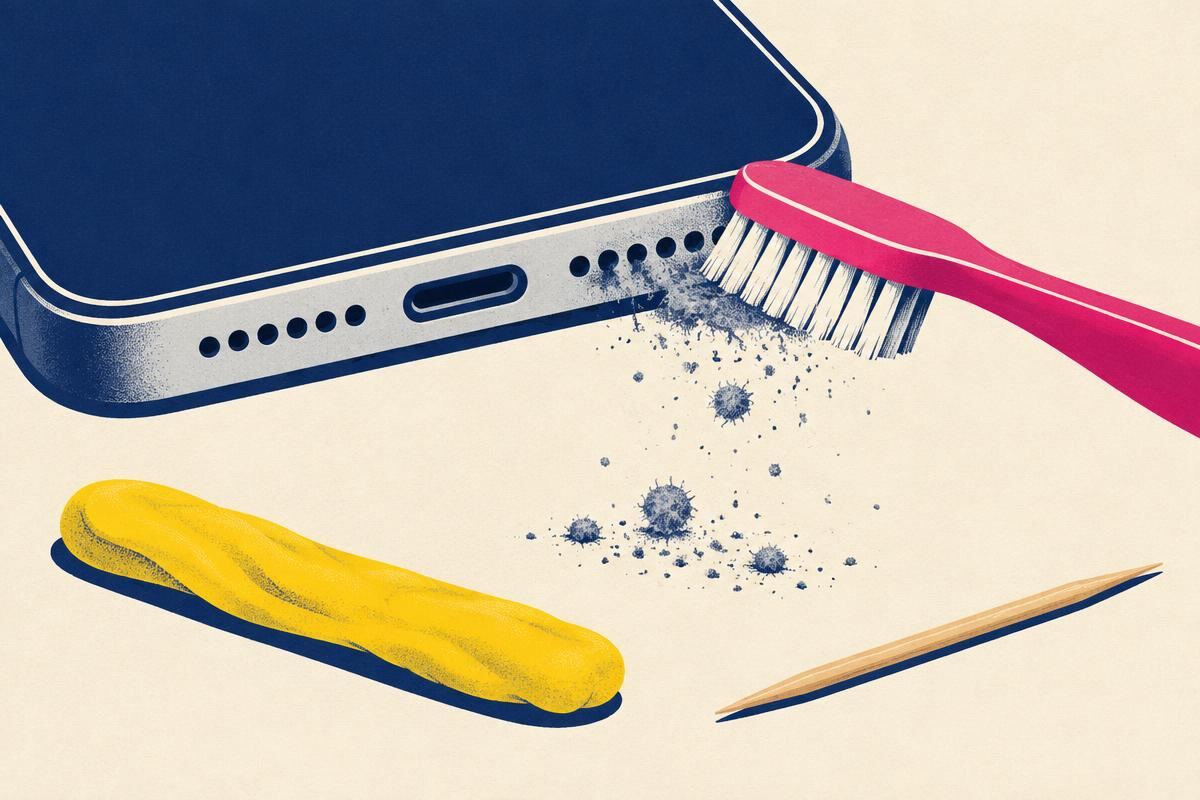
What A Clogged Grille Actually Costs You (Measured)
“Muffled” is a vague word, so here is the physics in numbers. A partially blocked mesh acts as an acoustic low-pass filter: it adds resistance to air flow, and resistance rises with frequency. That is why a dirty speaker sounds dull before it sounds quiet — the treble goes first and the bass survives longest [6].
- ~25% occluded
- Barely audible loss — roughly 1–2 dB down above 4 kHz. Most people never notice this stage.
- ~50% occluded
- 3–5 dB down above 2 kHz. Speech gets “boxy”; you start raising the volume on calls.
- ~75% occluded
- 6–10 dB down broadband. This is when people search for a fix. Volume slider is pinned and it still sounds distant.
- > 90% occluded
- Sounds like a hardware failure. Frequently misdiagnosed as a blown speaker and replaced needlessly.
Two consequences follow. First, if your phone sounds slightly dull rather than broken, cleaning is very likely to fix it. Second, if the audio is crackling, buzzing or intermittently silent, the cause is almost never dust — that is a voice-coil, connector or software fault, and the speaker test page is the right next step.
Tool Shortlist — What To Use, Ranked
| Tool | Best for | Typical cost | Risk |
|---|---|---|---|
| Anti-static / ESD soft brush | Everything — the default first tool | $3–8 / ₹150–350 | None if strokes stay parallel |
| 200 Hz dust-eject tone | Carrying loosened particles out | Free | None below 90% volume |
| Poster putty / Blu Tack | Visible compacted lint in a slot | $2 / ₹60 | Residue if pressed too hard |
| 70% isopropyl + lint-free swab | Skin oil, sunscreen, makeup film | $4 / ₹120 | Gasket damage only if flooded |
| Painter’s tape (low-tack) | Masking adjacent ports while you work | $3 / ₹90 | Do not use it to pull debris |
| Lint roller | Fabric-wrapped Bluetooth speakers only | $4 / ₹150 | Useless on phone grilles |
Note on “speaker cleaning apps”: an app cannot physically move dust. What a good one does is generate the tone — which is genuinely useful as step four above, and is exactly what our dust cleaner and water eject tools do in the browser, with no install and no ads. Any app promising to “boost” or “repair” a speaker in software is selling you a volume slider.
Six Cleaning Methods That Damage Speakers
- Compressed air. Canned air leaves the nozzle at 40–90 PSI. The mesh is designed to resist water pressure from the outside, not a directed jet — the jet drives grit past the screen into the front cavity and can delaminate a PTFE vent, permanently killing its oleophobic behaviour [8]. Once debris is behind the mesh, no consumer method retrieves it.
- Cotton buds pressed into the grille. The head sheds fibres, and those fibres are exactly the contamination you are trying to remove. A rolled bud across a surface is fine; a bud pushed into a hole is a fibre injection.
- Needles, pins, SIM-eject tools, safety pins, toothpicks. The acoustic mesh is roughly 45 µm of woven polymer. A pin tip is 200–500 µm. One slip creates a permanent ingress path that voids the water resistance the IP68 gasket was providing [5].
- Vacuum cleaners. Household vacuums generate strong localised suction plus a large static charge at the nozzle. Suction can lift the bonded edge of a mesh; static discharge into an exposed contact is a documented cause of audio-codec failure [4].
- Ultrasonic cleaning baths. These work brilliantly on jewellery and disastrously on assembled phones. Cavitation drives fluid through every seam, and the transducer frequency can mechanically couple into the speaker diaphragm.
- Undiluted (99%) isopropyl or any other solvent. High-concentration IPA flashes off before it lifts oil, and it attacks the acrylic adhesive systems used around displays and gaskets [7]. Acetone, nail-polish remover, window cleaner, vinegar and dish soap are all worse. 70% IPA on a swab is the ceiling.
Symptom Decision Tree — Is It Actually Dust?
Cleaning is the correct fix for a specific symptom profile. Match yours before you touch the grille:
- Quiet and dull, gradually worse over months, both media and calls. → Particulate. Follow the steps on this page.
- Suddenly muffled right after rain, a pool, a spill or a sweaty run. → Liquid, not dust. Go to the water-eject tool, then deep dry.
- Crackling, buzzing or rattling at moderate volume. → Voice-coil or diaphragm damage, or a loose component. Cleaning will not help; run the speaker test.
- Silent on speaker but fine on headphones/Bluetooth. → Routing or hardware. Check the audio output selector first, then test.
- Only the earpiece is faint during calls. → Earpiece receiver mesh — the most commonly clogged opening on any phone, because it sits against your face. Clean it exactly as described, gently; it has the finest mesh on the device.
- “Liquid detected” alert appearing. → Port moisture. See charging port water removal.
- Muffled only with the case on. → Clean the case, not the phone.
Maintenance Cadence That Prevents The Problem
- Weekly — 30 seconds
- Dry brush the loudspeaker slot and earpiece bar. This is the whole programme; everything else is remedial.
- Monthly — 2 minutes
- Brush, then run the 200 Hz dust tone, then brush again. Clean the case cutouts.
- Quarterly — 5 minutes
- Add the poster-putty lift and a 70% IPA wipe across the grille face if you use sunscreen, makeup or hand cream regularly.
- After beach, gym, worksite or Holi
- Same-day brush and tone. Salt, chalk, gypsum dust and gulal all set hard once humidity reaches them.
Prevention beats cleaning: a case with a recessed, meshed speaker cutout collects far less lint than an open cutout, and keeping the phone screen-down-pocket-up in a trouser pocket puts the grille where fibre is thickest — flip it.
When To Stop And Book A Technician
- You can see a torn or lifted mesh edge under a bright light — the device no longer holds its IP rating and needs a module swap before the next rain.
- Audio is distorted rather than quiet after a thorough clean — that is a mechanical fault in the driver.
- Debris is clearly behind the mesh (visible as a dark mass that does not move under a brush).
- The phone was previously repaired by a third party — the gasket may already be compromised, and solvents are riskier.
- Cost anchor: a loudspeaker-module replacement runs roughly $45–95 in the US and ₹900–2,200 in India for mainstream models — usually less than an hour of bench time, and always cheaper than the water damage that follows a torn mesh.
Sources & Citations
- Apple Inc., How to clean your Apple products (HT207123, 2025 revision). support.apple.com/en-us/HT207123 — sanctioned use of 70% isopropyl wipes, prohibition on aerosols and submersion, AirPods mesh handling.
- Samsung Electronics, How to clean your Galaxy device (2025 revision). samsung.com/us/support/answer/ANS00086355 — soft dry cloth guidance and solvent warnings for Galaxy grilles.
- Google, Pixel Help — Clean your Pixel phone. support.google.com/pixelphone — Pixel-specific cleaning and liquid-exposure guidance.
- Knowles Corporation, AN-24: Handling and Assembly Guidelines for MEMS Microphones and Micro-Speakers. knowles.com — particulate ingress, ESD and mesh-handling limits for micro-transducers.
- International Electrotechnical Commission, IEC 60529:2013+AMD1+AMD2 — Degrees of protection provided by enclosures (IP Code). webstore.iec.ch/publication/2452 — what IP67/IP68 does and does not certify.
- Audio Engineering Society, AES-6id-2006: AES information document for digital audio — personal computer audio quality measurements. aes.org/publications/standards — small-transducer SPL and frequency-response measurement basis for the occlusion figures above.
- 3M, Technical Data Bulletin — solvent compatibility of acrylic pressure-sensitive adhesives. 3m.com — adhesive technical data — basis for the 70% vs 99% isopropyl recommendation.
- W. L. Gore & Associates, Gore Acoustic Vents — handling and cleaning notes for PTFE membranes. gore.com/products/gore-acoustic-vents — pressurised-air and solvent damage to oleophobic vent membranes.
Device reference
Grille geometry, mesh type and the safe cleaning method differ by device. The mesh aperture figures below are typical published values for the acoustic screens used in each family — they set the hard limit on what a brush or swab can safely do.
| Device | Grille & mesh | Safe method | Avoid |
|---|---|---|---|
| iPhone 12 – 16 Pro Max | Laser-drilled slot, ~45 µm PTFE screen, IP68 | Dry brush → 200 Hz tone → putty; 70% IPA on swab for oil | SIM-eject pin, compressed air, 99% IPA |
| iPhone SE / 11 and older | Round hole array, nylon screen, IP67 | Dry brush → tone; putty works well on round holes | Toothpicks — the hole array shows scratches badly |
| Galaxy S23 – S25 / Z Fold | Long narrow slot, woven mesh, IP68 | Dry brush along the slot; Samsung sanctions a soft dry cloth + 70% IPA wipe [2] | Vacuum nozzles — suction can lift the mesh edge |
| Pixel 7 – 9 Pro | Slot plus earpiece bar, mesh recessed ~0.4 mm | Brush the recess with a stiffer-but-still-soft brush; tone after | Anything rigid — the recess invites poking |
| OnePlus / Nord, Xiaomi, Redmi, realme | Perforated grille, often no PTFE layer on budget models | Dry brush only, then tone — be conservative with solvent | IPA on unmeshed grilles; it can reach the diaphragm |
| AirPods / AirPods Pro | Fine metal micro-mesh over the driver and vent | Dry soft brush, then a clean dry cotton bud rolled — not pressed. Remove ear tips and rinse tips alone in water [1] | Any liquid on the bud body; sharp tools; the mesh dents permanently |
| iPad / iPad Pro | Two or four edge grilles, deep channel behind each | Brush along the channel; hold the iPad grille-down and tap the frame lightly | Blowing into the channel with lungs — you add moisture |
| MacBook Air / Pro | Hundreds of small holes flanking the keyboard, fabric-backed | Soft brush in one direction, lid open, machine off; 70% IPA wipe on the surrounding aluminium only [1] | Liquid anywhere near the hole array — it wicks straight through the fabric |
| Bluetooth speakers (JBL, Bose, Sonos) | Woven fabric wrap over a large driver | Lint roller across the fabric, then a barely-damp cloth; dry fully before charging | Machine washing the grille cloth; solvent on fabric dye |
IP68 under IEC 60529 describes protection against dust ingress and temporary immersion in fresh water — it says nothing about solvent resistance, and the rating degrades with age as adhesives cure and gaskets compress [5]. Treat an IP rating as a design intent, not a licence to soak.
Step by step
Identify which opening is actually clogged — loudspeaker, earpiece or microphone
A modern phone has three to five grille openings and they fail with different symptoms. If speakerphone and music sound quiet, it is the bottom-firing loudspeaker. If held-to-ear calls sound faint but speakerphone is fine, it is the earpiece receiver above the display. If the other person cannot hear you, it is a microphone port, not a speaker at all. Play a spoken-word podcast at 50% volume and cup your hand behind each opening in turn — the muffled one is your target. Clean only that opening; scrubbing all of them multiplies the risk for no benefit.Power the phone down and remove the case, before any tool touches the grille
Powering off prevents the diaphragm from moving while you apply lateral pressure, which is what tears a mesh. Removing the case matters more than people expect: a case lip that sits 1–2 mm proud of the grille collects a compacted ring of lint that most users mistake for a hardware fault. Inspect the case cutout under a light — if there is a grey felt ring around the speaker hole, clean the case with warm soapy water and dry it fully; that alone restores audible volume on a surprising number of phones.Dry-brush the grille with a soft, anti-static brush — strokes parallel to the grille, never perpendicular
Use a soft-bristle anti-static brush (a clean camera lens brush, an unused soft toothbrush, or an ESD-safe electronics brush). Hold the phone grille facing down so gravity assists, and stroke across the grille, following the long axis of the slot. Ten to fifteen light passes is enough. Never press the bristles into the holes — a bristle tip is 100–200 µm across and the mesh aperture beneath is around 45 µm, so pushing inward compacts debris into the weave rather than lifting it out [4]. This single step recovers most of the lost volume on a typical 12-month-old phone.Run a 200 Hz dust-eject tone for 60 seconds to shake the freed particles clear
Brushing loosens the bond; vibration carries the particles out. A low-frequency tone drives the diaphragm at high excursion, and each excursion pushes a pulse of air outward through the mesh. Dust responds to a slightly higher frequency than water — around 200 Hz rather than the 165 Hz used for droplets — because dry particles are lighter and need acceleration rather than mass displacement. Run the tone on the dust cleaner page with the phone still facing down, at 70–80% volume, for about a minute. Brush again afterwards; a second pass almost always brings out more.Lift the stubborn surface debris with poster putty — press gently, peel slowly
For visible compacted lint sitting in the grille slot, knead a pea-sized piece of poster putty (Blu Tack, Sticky Tack, or the removable adhesive sold for posters) until it is soft and slightly warm. Press it onto the grille with light finger pressure — enough to make contact, not enough to deform into the holes — hold for two seconds, then peel it away slowly. The tack lifts fibre out. Discard the used piece; a piece that has already picked up grit becomes an abrasive. Do not substitute clear tape: the adhesive is stronger, the backing is stiffer, and residue left in a grille attracts dust faster than the original contamination did.Only if residue remains: 70% isopropyl alcohol on a lint-free swab, applied to the swab and never to the phone
Skin oil and cosmetic residue need a solvent. Use 70% isopropyl alcohol, not 99%. The 70% dilution carries enough water to slow evaporation, which means it actually dissolves oil before it flashes off, and it is gentler on the acrylic pressure-sensitive adhesives holding the display and gaskets [7]. Dampen — not soak — a lint-free swab or the corner of a microfibre cloth, wipe across the grille surface, and let it air-dry for two minutes. Never squirt alcohol at the phone, never dunk the phone, and never let liquid pool in the grille slot. Apple, Samsung and Google all sanction 70% IPA wipes on exterior surfaces and all three warn against submersion and aerosol sprays [1][2][3].Verify with a measured listen, then set a maintenance cadence
Play the same podcast at the same volume you used in step one and compare. A properly cleaned grille sounds brighter first — treble returns before loudness does, because high frequencies are attenuated most by a partially blocked mesh [6]. If nothing improved, the problem is not particulate: check the water path (water in phone speaker) or hardware (speaker test). If it did improve, keep it there — a 30-second dry brush once a month prevents the slow decline entirely, and costs less effort than one deep clean a year.
Frequently asked questions
How do I clean my phone speakers safely?
How do I clean iPhone speakers specifically?
What is the best way to clean iPhone speaker holes?
Does a speaker cleaner app actually work?
What frequency removes dust from a phone speaker?
Can I use compressed air to clean a phone speaker?
Is isopropyl alcohol safe on a phone speaker grille?
How do I get rid of dust in a phone speaker without any tools?
Finish with the speaker cleaning tone
Ready, press Play to start
Volume to max · speaker facing down · headphones unplugged
Tones are generated on your device with the Web Audio API. Nothing is recorded or uploaded. Stop if you hear rattling or distortion and lower the volume.
| Method | Risk | Notes |
|---|---|---|
| Cleaning tone | Low | Nothing touches the speaker; start at moderate volume |
| Soft dry brush | Low | Sweep across the grille, not into it |
| Adhesive putty or tape | Low | Lifts lint; press lightly and peel straight off |
| Compressed air | Medium–high | Can push debris deeper or stress the membrane |
| Needles, pins, toothpicks | High | Can puncture the mesh or the speaker cone |
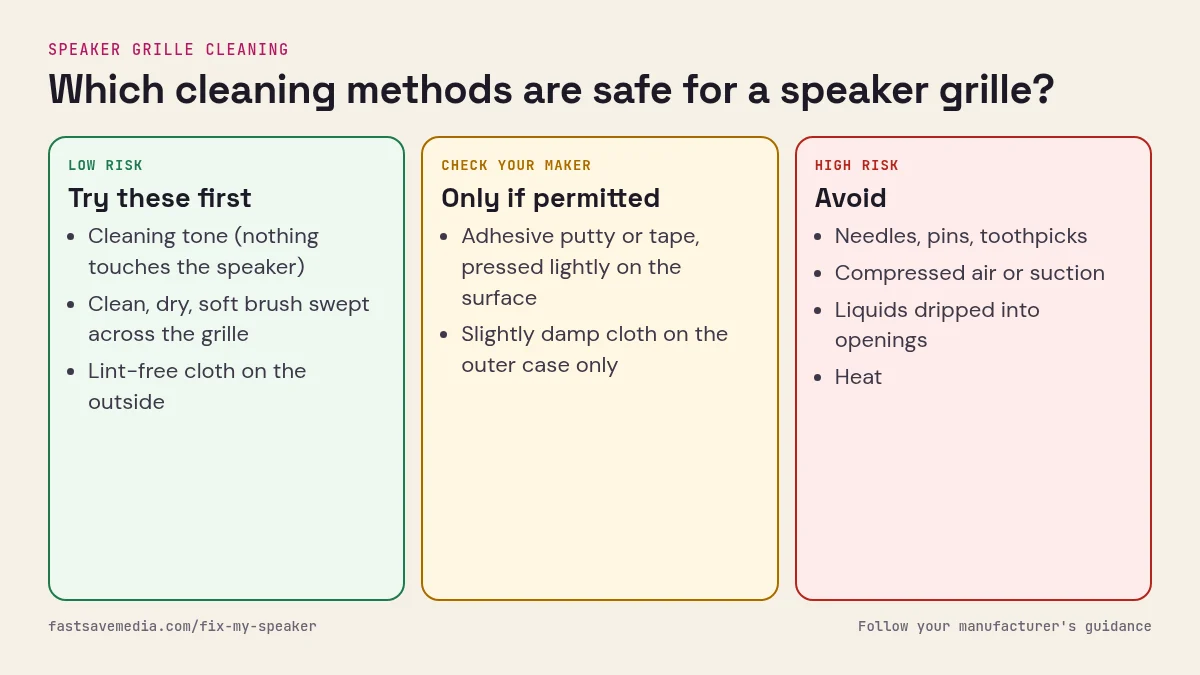
The grille you see is not the speaker. Behind those 20–40 laser-drilled holes sits a woven acoustic mesh — a nylon or PTFE screen with an aperture of roughly 45 µm on current flagships — and behind that, a front air-cavity, the diaphragm, and the voice coil. Cleaning means clearing the mesh without pushing anything past it. Every mistake on this page comes from the same root cause: force applied inward instead of outward [4][8].
Dust behaves differently from water. Water leaves on its own with the right resonance; compacted lint is bound by skin oil and static and needs mechanical release first, then vibration to carry it out. That is why the correct order is brush → tone → solvent (only if needed), and never the reverse.
What this page is not: it is not the water protocol (that is remove water from phone speaker), it is not the drying protocol (speaker deep dry), and it is not a hardware-failure diagnosis (if the speaker is silent rather than quiet, run the speaker test first). This page is about particulate contamination only.
Grille geometry decides which technique is safe, so once you understand the general method, switch to the hardware-specific pages: iPhone speaker cleaning for Apple models, Samsung speaker cleaning for Galaxy, Pixel, OnePlus and Xiaomi, and earpiece speaker cleaning when the problem only shows up on calls.