In this article
- Views tell you distribution; watch time, shares and saves tell you whether the Reel was actually worth watching.
- Compare rates, not raw counts: shares ÷ reach and saves ÷ reach let you compare Reels of different sizes fairly.
- Review a Reel after a few days and compare it with your own recent Reels, not with other accounts.
- Change one thing at a time (hook, length or topic) so the numbers tell you what worked.
Instagram Insights shows a lot of numbers for each Reel, and it is easy to chase views alone. This guide explains which Reels metrics are most useful for improving content, how to turn them into simple rates, and how to run small tests. It complements our broader Instagram Insights guide.
Insights is available on professional (Business or Creator) accounts. Metric names and availability change over time and can differ by region, so treat the names below as what to look for, not a guaranteed layout.
1. The Reels metrics that matter
| Metric | What it tells you |
|---|---|
| Views | How often the Reel was played; a distribution signal |
| Accounts reached | Unique accounts that saw it |
| Average watch time | Whether people stayed; compare to the Reel's length |
| Shares | People sent it to someone; a strong usefulness signal |
| Saves | People want to come back to it; typical for tips and tutorials |
| Follows from the Reel | Whether it converted viewers into an audience |
2. Turn counts into comparable rates
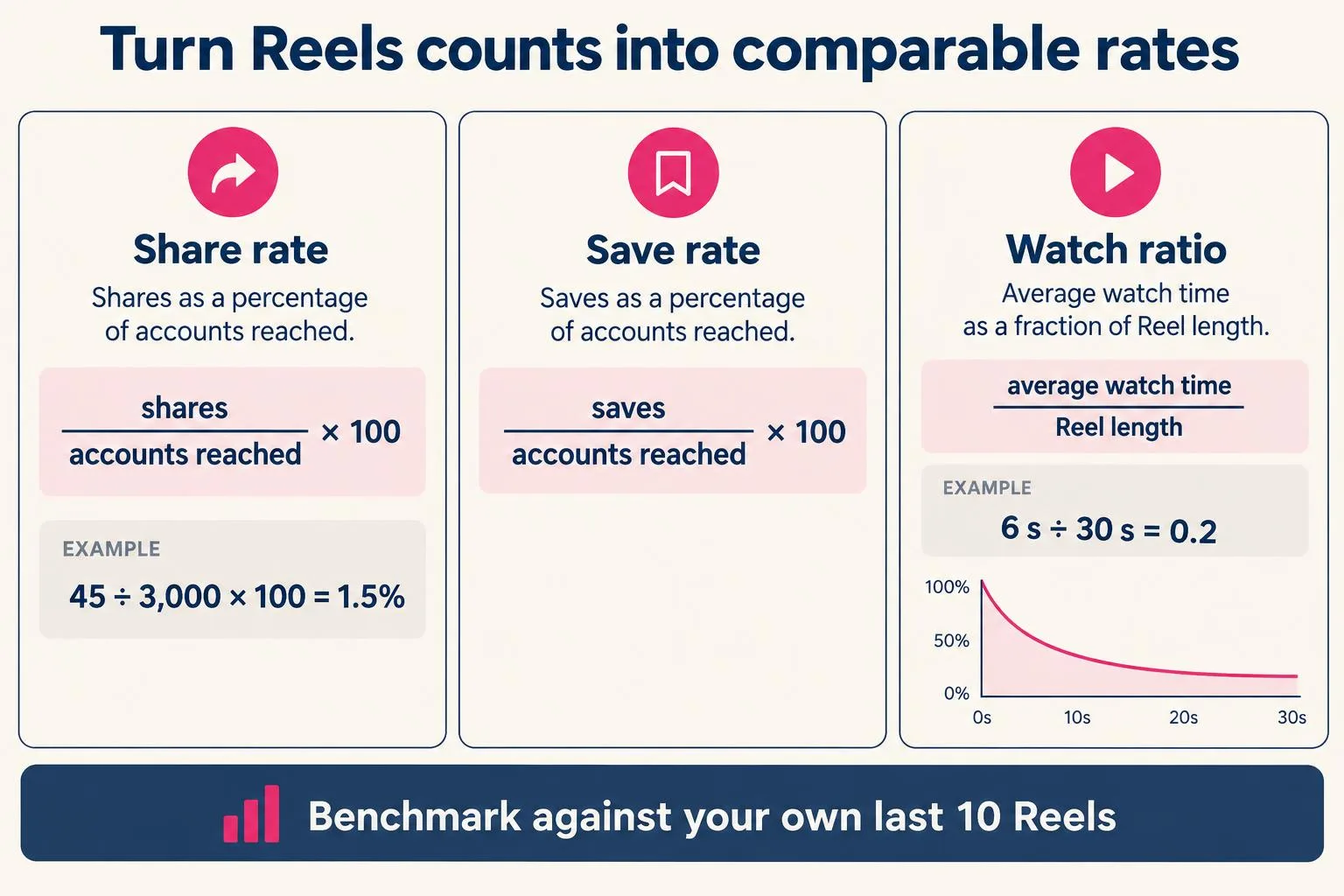
Raw numbers grow with reach, so divide by reach to compare Reels fairly:
- Share rate = shares ÷ accounts reached × 100. Example: 45 shares from 3,000 accounts = 1.5%.
- Save rate = saves ÷ accounts reached × 100.
- Watch ratio = average watch time ÷ Reel length. A 6-second average on a 30-second Reel is 0.2, which suggests the hook or pacing lost people early.
There is no universal "good" rate. Your own last ten Reels are the benchmark that matters.
3. Read the retention pattern
Where Insights shows retention or watch-time detail, look at where viewers drop. A steep fall in the first seconds points to the hook or the first frame. A steady slide in the middle points to pacing. Text or key visuals covered by Instagram's buttons can also hurt; check framing with our Safe Zone Checker before posting.
4. A simple weekly test routine
- Pick one variable: hook line, length, topic or posting time.
- Post two or three Reels that change only that variable.
- After a few days, record reach, watch ratio, share rate and save rate in a sheet.
- Keep what improves the rates over several posts, not one lucky Reel.
5. Metrics and earnings estimates
Brands care about engaged audiences more than views. If you want a rough idea of sponsorship value from your follower count and engagement, our Earnings Calculator gives an estimate range; it is a planning aid, not a quote or a guarantee.
Frequently asked questions
What is a good share rate on Instagram Reels?
Are views or reach more important?
When should I check Reels Insights?
Why can't I see Insights?
Nayeem — Software Developer of fastsavemedia.com
Built FastSaveMedia to provide free, privacy-first web utilities. Most tools process files in your browser without server uploads; tools that use an online service explain this on their page. Focuses on web performance, audio signal processing, and accessible digital tools.
LinkedIn profile