Skip to content

Free screen diagnostic · runs locally

Black Spots on Display

Fullscreen visual check

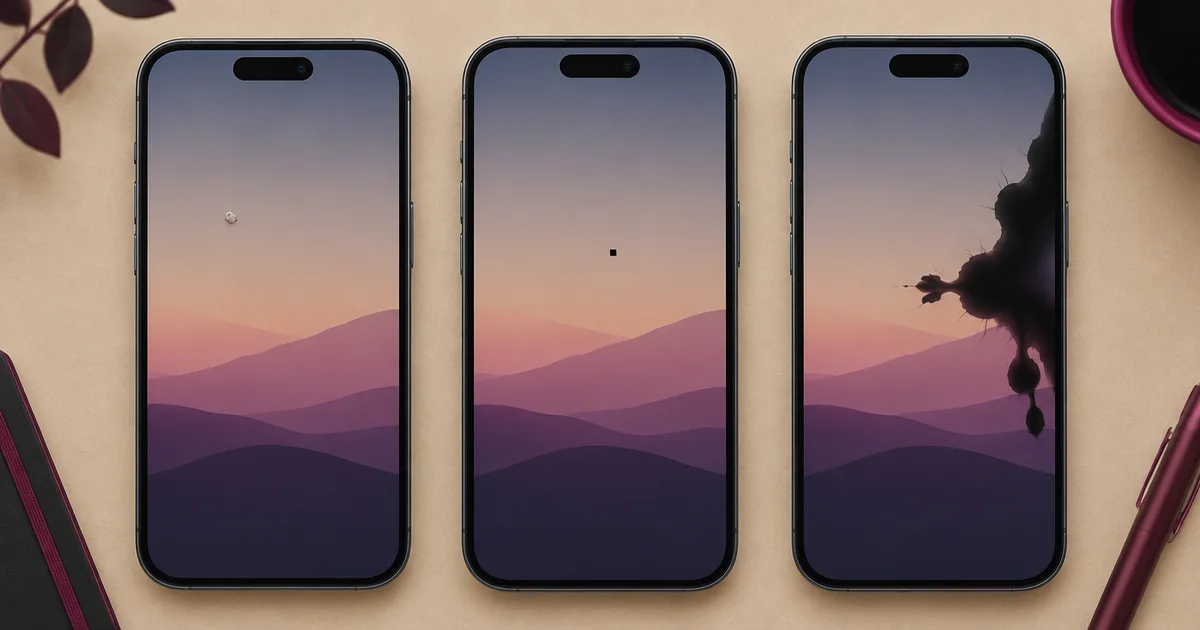
Compare the spot's shape on every frame. Do not press an irregular or spreading dark area.

By Nayeem, Software Developer of fastsavemedia.comLast reviewed
Illustrated display comparison of surface dirt, a dead pixel and irregular LCD black spot damage
Diagnostic illustration comparing three visually similar causes of a dark screen spot.

How to run this check

  1. Step 1

    Clean the surface

    Power down and gently clean the outer glass or protector.

  2. Step 2

    Use a white frame

    Mark the size and outline of every dark area without pressing it.

  3. Step 3

    Compare RGB frames

    Check whether the point stays black on red, green and blue.

  4. Step 4

    Test touch nearby

    Use the coverage grid to see whether input also fails around the visible spot.

What causes a black spot on a display?

A dark mark can be debris on the protector, a single dead pixel, a cluster of failed pixels, or physical LCD damage after impact, pressure, heat or liquid exposure. The shape and whether it changes across test colors provide clues.

Dead pixel or spreading LCD damage?

A dead pixel is usually a tiny, sharply defined point that remains dark on red, green, blue and white. Physical LCD damage is often larger and irregular, may look like ink under glass, and can spread after further pressure. Do not squeeze the area to see whether it moves.

Check the touch layer separately

The visible panel and touch digitizer are different layers. A black spot can exist while touch still works, or the same impact can create a nearby dead zone. Run the coverage grid and drawing test around the area without pressing harder than normal.

Frequently asked questions

Can software remove a black spot on a phone screen?
Software cannot repair cracked or displaced display layers. A temporary overlay or app issue may disappear in a screenshot or after restarting, while physical damage remains fixed.
How can I tell if it is surface dirt?
Power down and clean the outer glass gently. If a protector is fitted, inspect its surface and edges. Internal spots remain fixed beneath the surface.
Will a black LCD spot spread?
Physical liquid-crystal damage can spread after more pressure or flexing. Avoid pressing the spot and document its outline for comparison.
Does a black spot always mean touch is broken?
No. Display and touch are separate layers, although one impact can damage both. Use the touch grid to check input around the spot.